Orveta Labs
IDEN
Orveta Arah

Your money.Your direction.

Personal finance by Orveta Labs. Understand your money, plan your next step, and keep financial records on your device.

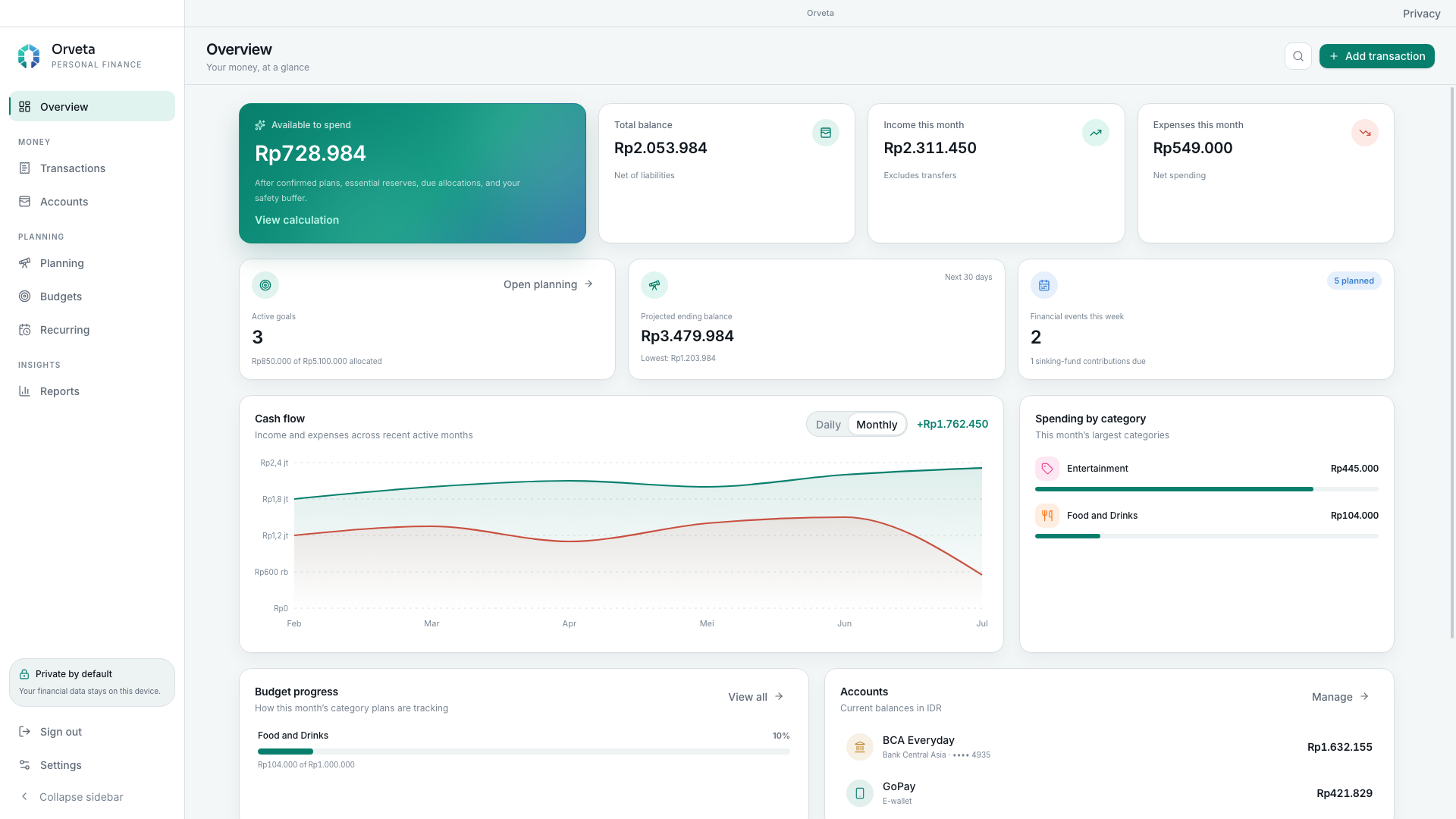
Overview Orveta. Balances, cash flow, and spending by category using example data.
Development preview / Example data

Local records. Personal control.

In development

Make sense of the everyday.

Start with a small record. Find the bigger picture.

Choose a topic, then explore the app screens.

Start with a small record.

Morning coffee, weekly groceries, your monthly salary. Record income and expenses so the story of your money does not simply pass you by.

Choose a screen: Record
Transactions Orveta. Three example transactions: monthly salary, cinema, and lunch.
Transactions Development preview Example dataView full image

Find the story behind each transaction.

Review the income and expenses you have recorded.

  1. Use search and filters to narrow the list by account, category, type, or date.

  2. Each record shows its amount, date, and account so you can understand both income and spending.

Accounts Orveta. Example balances in a BCA Everyday account and a GoPay wallet.
Accounts Development preview Example dataView full image

Know the balance in each account you record.

See an overview and the details of accounts you manage in Arah.

  1. Compare assets, liabilities, liquid funds, and net balance from your account records.

  2. Keep separate records for banks, wallets, or cash. Balances come from your records, not an automatic bank connection.

Recurring Orveta. An example streaming-subscription schedule reviewed before it affects balances.
Recurring Development preview Example dataView full image

Remember expenses that come around again.

Keep a schedule of income or expenses that repeat.

  1. Record repeating items, such as a monthly subscription, with their account and category.

  2. Review the amount and next due date. A schedule does not move money; posting a transaction still requires your action.

See the patterns. Know the story.

See your balances, cash flow, and spending by category. More than a series of numbers: a picture that helps you understand where your money goes.

Choose a screen: Understand
Overview Orveta. Balances, cash flow, and spending by category using example data.
Overview Development preview Example dataView full image

Understand your money at a glance.

See what is available, how money moves, and where your spending goes.

  1. An estimate after planned expenses, reserves, and allocations are considered. It is different from your total balance.

  2. Compare income and expenses over time to see your cash-flow patterns.

  3. See your largest spending categories to decide what you want to review.

Budgets Orveta. An example July 2026 food-and-drinks budget with planned and actual spending.
Budgets Development preview Example dataView full image

Give monthly spending a guide.

Compare your spending plan with expenses you have recorded.

  1. See what you planned, what you spent, and how much room remains in the budget.

  2. Track category spending so you know when to revisit your plan.

Reports Orveta. Example reports of income, spending, spending composition, and balance distribution.
Reports Development preview Example dataView full image

Turn records into patterns you can understand.

Review a summary for the period you choose.

  1. Compare income with expenses and see the difference over the report period.

  2. See each category’s share of spending to understand what uses most of your money.

Make room for your plans.

Set budgets, compare them with your spending, and plan financial goals. Choose a next step that makes sense for your own circumstances.

Choose a screen: Plan
Forecast Orveta. An example cash-flow forecast with conservative, expected, and optimistic scenarios.
Forecast Development preview Example dataView full image

See how your plans could affect your balance.

Explore estimates based on recorded balances and plans, not guaranteed future outcomes.

  1. Choose a time range and scenario to review how different assumptions affect the estimate.

  2. The chart shows projected balances from your records and plans. Changing those plans can change the calculation.

Planning Orveta. An example breakdown of available spending money, reserves, and goal allocations.
Planning Development preview Example dataView full image

See spending room after your plans are considered.

Understand how upcoming expenses, reserves, and goals affect the available-to-spend estimate.

  1. See what adds to or reduces the estimate. The result depends on the records and plans you enter.

  2. Review goal progress and the projected balance summary for the upcoming period.

Goals Orveta. Example emergency-buffer and getaway goals with allocations and contribution schedules.
Goals Development preview Example dataView full image

Make saving goals easier to follow.

See progress and the next step toward goals you set yourself.

  1. Compare the target, money already allocated, and the amount still needed.

  2. See the contribution date and amount. Completing a contribution records an action; it does not automatically transfer money.

Sinking funds Orveta. An example annual-insurance sinking fund with its target, allocation, and contribution.
Sinking funds Development preview Example dataView full image

Prepare for a future expense, a little at a time.

Set aside allocations for an expected cost, such as annual insurance.

  1. See how much is allocated and what is still needed before the expense is due.

  2. Review the next allocation date and record a contribution when you choose to make it.

Planned transactions Orveta. Example future transactions with certainty levels and posting actions.
Planned transactions Development preview Example dataView full image

Separate future plans from transactions that happened.

Record expected income and expenses before they become part of your transaction history.

  1. Distinguish confirmed, likely, and tentative plans so projections are easier to understand.

  2. Post records an eligible plan as a transaction. You take this action yourself; it does not make a payment.

Calendar Orveta. An example calendar bringing together planned transactions and goal contributions.
Calendar Development preview Example dataView full image

Know what is coming next.

Review planned transactions and goal contributions in one financial agenda.

  1. Choose the period you need, then narrow the agenda by account, event type, or certainty.

  2. See each event’s date, amount, and source. Posting or completing a contribution requires an action you choose.

Personal finance, with direction.

Still yours.

Financial records stay on your device. Account and authentication information is handled online separately.

About privacy

Room for what’s next.

From this month’s spending to your next goal. See your plans with a little more clarity.

Plan

Small things. Made meaningful.

Software that makes room for what matters. Clear in purpose. Close to everyday life.

Orveta LabsThe studio behind it
Orveta ArahThe personal finance product

Clear from the start

Language that makes sense. A next step that is easy to find.

Useful every day

Starting with real habits, rather than simply adding features.

Thoughtful about data

Explain what stays on your device and what needs an online service.

A few things
worth knowing.

How are Orveta Labs and Orveta Arah related?

Orveta Labs is the studio behind the software. Orveta Arah is our personal-finance product, previously called Orveta. Each has its own name and logo.

Can I use Orveta Arah yet?

Arah is still in development and testing. This site presents a preview; it does not offer public downloads or registration. The current reference version runs on macOS; versions for other devices are planned.

Where is my financial information stored?

The reference version of Arah stores financial records on your device. Account and authentication information is handled online separately. Creating an account does not by itself enable financial-data synchronization. See the privacy page for more detail.

Why would I receive an email from Orveta Arah?

In the account flows being tested, signup verification and password recovery use email. Account emails come from following an account-related action. Public registration is not available through this site. If you did not request a message, ignore it or contact support@orvetalabs.com.

Does Arah have a beta waitlist?

The beta page shows waitlist status and platform availability. When open, joining requires email confirmation and is limited to 1,000 active confirmed emails across macOS, iOS/iPadOS and Android. Beta emails come from beta@orvetalabs.com. Joining does not create an app account or grant access.

Get to know Arah early.

Arah is still in development. Visit the beta page for platform status and waitlist information.

Arah beta

Something on your mind?

support@orvetalabs.com
Development preview Example data